
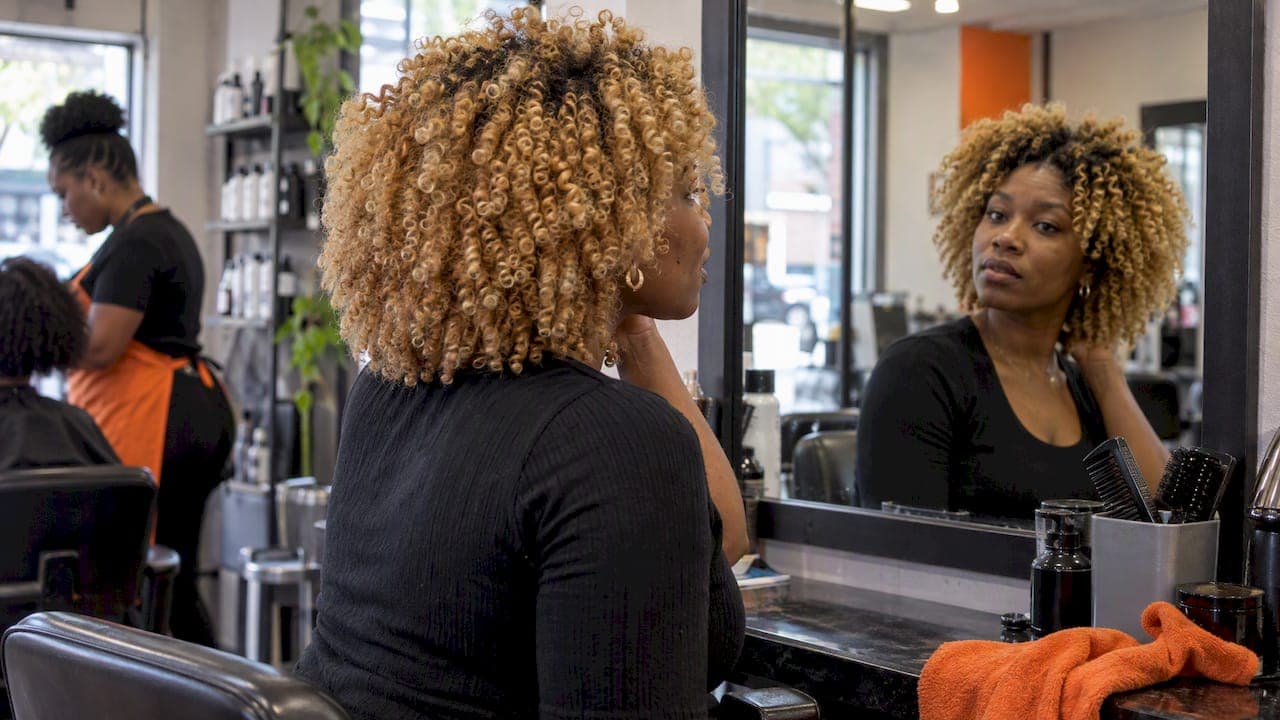
Start with a photo upload: it is a straightforward way to preview blonde on your own face, and a live AR mirror is the follow-up for checking movement. Choose a texture-first tool so tight coils and edges are not flattened. Stick to depth levels 6–11, from bronde to platinum, and use the complimentary credits we give you to test a few before booking any appointment.
TL;DR:
- Photo uploads let you compare shades under controlled lighting; live AR shows movement but requires camera access, while wigs or clips provide a daylight check.
- Levels 6 to 7 offer bronde with less lightening, while levels 10 to 11 create high contrast and require more lift, toning, and upkeep.
- Warm undertones pair well with honey and caramel, while cool or rosy undertones suit ash or platinum; highlights and root shadows keep blonde dimensional.
- Going from dark hair to blonde often takes several salon sessions spaced weeks apart; bond treatments, conditioning, and heat protection help limit damage between visits.
- Before uploading, check whether the app stores your photo, uses it to train AI, and explains deletion; revoke camera access when finished.
Table of Contents
- Which blonde hair try on method should you use first?
- How do virtual try-on tools work, and why does live AR feel different?
- How do you choose the right blonde shade for your skin tone?
- How do you make a photo preview look like a real salon result?
- What should you check about privacy before uploading a face photo?
- What happens if you actually go blonde?
- Why does a texture-first catalog make blondes look believable?
- Try blonde risk-free with our free credits
- FAQ
- Sources
Which blonde hair try on method should you use first?
You have three real routes, and the right one depends on how much realism you need and how comfortable you are with camera access.
- Photo upload: quick, low-pressure, and enough for comparing shades side by side. The downside is a static image, so you won't see how color catches light as you move.
- Live AR mirror: tracks your movement and tends to feel closer to a real mirror. It needs camera access, which some people hesitate over.
- Physical tests: a blonde wig, a temporary color spray or clip-in pieces tell you how a shade feels against your skin in daylight. They are one-off checks, not a way to browse a range of shades.
For textured hair, we suggest starting with a photo upload because you control the lighting and angle, then confirming your favorite with a mirror or a physical piece. If you are comparing apps first, our roundup of texture-first hair color apps shows how they perform on Black hair.
How do virtual try-on tools work, and why does live AR feel different?
Every tool runs the same basic job: find your hair, then recolor it. What changes is how well it handles the details. Here is what happens under the hood:
- A photo-based tool detects the hair region in a still image and overlays a color on it. Tight coils, fine edges and shrinkage are where generic tools slip, leaving a flat helmet or a glowing halo.
- A virtual mirror does the same thing on a live video feed, so it also has to track your head as you turn. Field experiments found that virtual mirror try-ons deliver higher decision quality and lower regret than photo-based ones, though perceived intrusiveness weakens that advantage.
- Realism then depends on three things: how diverse the style catalog is, how the shade-mapping logic treats dark bases, and how well the tool adapts to your lighting.
A try-on can also set accurate expectations and cut post-purchase dissonance, but only when it holds up across diverse hair types and skin tones. That is the test to run on any tool you try.
How do you choose the right blonde shade for your skin tone?

Two rules do most of the work: match undertone, then pick a depth.
According to Madison Reed's shade guide, golden and honey blondes complement warm or olive complexions, while ash and platinum harmonize with cool or rosy skin. Many deeper complexions have golden or red undertones, which is why honey and caramel blondes so often read as natural. Our honey blonde guide for dark skin shows what that looks like in photos.
Blonde runs from dark level 6–7 (bronde), through medium level 8–9 (classic beach blonde), to light level 10–11 (platinum). The higher the level, the more lift your hair needs and the more upkeep it demands.
- Levels 6–7: the safest first step. Bronde reads as dimensional brown in photos and needs the least lightening.
- Levels 8–9: a visible jump that still looks believable on most deep skin tones.
- Levels 10–11: high contrast and high maintenance. IPSY's blonde guide notes that very light shades need lift, toning and frequent upkeep.
- Dimension: highlights, balayage or a root shadow make blonde look lived in. Solid platinum from root to tip often looks flat on screen.
How do you make a photo preview look like a real salon result?
A preview is only as honest as the photo you feed it. Follow this checklist:
- Stand near a window with soft, even daylight and a plain backdrop. Avoid strong backlight, which blows out your edges.
- Take a clean, front-facing shot with your hair down and your usual part. Skip filters.
- Upload two or three angles if the tool allows it.
- Test a single-tone blonde and a dimensioned one, such as honey highlights over a darker root.
- For very light blondes, check that your brow depth still looks right and add a root shadow so the preview does not look pasted on.
Pro Tip: compare two depths that sit one or two levels apart, such as 8 and 10, using the same unfiltered photo. The gap tells you quickly how much lift you actually want.
What should you check about privacy before uploading a face photo?
Your face is personal data, so ask before you upload. A study of virtual try-on apps reports that people with high privacy concerns often perceive self-viewing features as more intrusive, and that clear privacy controls and transparent data policies increase positive brand sentiment and reduce hesitation.
- Is your face data stored after the session, and for how long?
- Is it used to train AI models?
- Can you delete it, and how?
- Does the tool explain camera permissions in plain language?
Simple habits help too: use temporary uploads, revoke camera access when you are done, and request deletion if a tool allows it. Our privacy checklist for hairstyle apps walks through useful questions to ask. For another privacy-aware take on try-on photography, see this partner guide on trying outfits on your photo.
What happens if you actually go blonde?
A preview takes seconds. The real thing takes weeks. Professional colorists describe moving from a darker base to blonde as a journey of multiple sessions spaced several weeks apart, with bond-building treatments between appointments to protect hair integrity.
Colorists typically aim to lift hair to a pale yellow level 10 before toning, and timing and developer strength have to be watched closely to avoid damage. That is why a good colorist may stage your lift instead of rushing it.
- Between sessions: use a bond-building treatment and deep conditioning, and protect your hair from heat.
- Ongoing tone care: Wella's guidance for bleached hair includes periodic purple shampoo, glosses every 3–8 weeks, deep conditioning and heat protection.
- Lower-commitment routes: dimensioned highlights, temporary sprays or a wig give you the look without a full lift.
Techniques matter as well. Foil, balayage and babylights add contrast, and darker hair often needs pre-lightening. If you want blonde without heavy bleach, our guide to hair color for dark skin covers softer options.
Why does a texture-first catalog make blondes look believable?
Most hair filters were built around straight or loosely wavy hair, and it shows on Black hair: colors bleed past the edges of coils, or the whole head looks smoothed flat. We built our catalog around authentic Black and textured styles. We also state that face data is processed securely, never retained and never used for AI training. When your preview respects your texture, you can trust what you see before you commit to the chair.
— Christelle
Try blonde risk-free with our free credits
You get complimentary credits when you start, enough to test a couple of blondes on your own photo before spending anything. Browse the Style Catalog to pick your looks, then see what fits on the plans page: the 1 Week Trial is $17.48 per week, and the 4 Week Plan is $38.73 per 4 weeks. A texture-first preview lets you explore the look before you decide.
FAQ
Can I try on blonde hair for free online?
Yes. With us, you get 2 complimentary credits to preview looks on your own photo with no commitment. Use them to compare a lighter bronde against a honey blonde before deciding anything.
How accurate is a blonde hair virtual try-on?
Accuracy depends on your photo and on how well the tool handles your texture. Even lighting, a front-facing shot and a texture-aware tool give the most believable result. Field experiments found live mirror try-ons improved decision quality over photo-based ones.
What blonde shade suits dark skin?
Warm golden, honey and caramel blondes are usually the most flattering starting point. Cooler ash tones can work too, depending on your undertone, so preview a few. Madison Reed's guide explains how undertone and depth interact.
Is it safe to upload my face to a hair color app?
It can be, if the app is clear about how it handles your data. Check whether photos are retained, whether they train AI models and how deletion works. Our privacy checklist lists the questions to ask.
How long does it take to go blonde from dark hair?
Often several salon sessions spaced weeks apart, not one appointment. Your colorist will set the pace based on your starting color and hair condition. Pump Haircare's colorist guidance describes the multi-session approach.